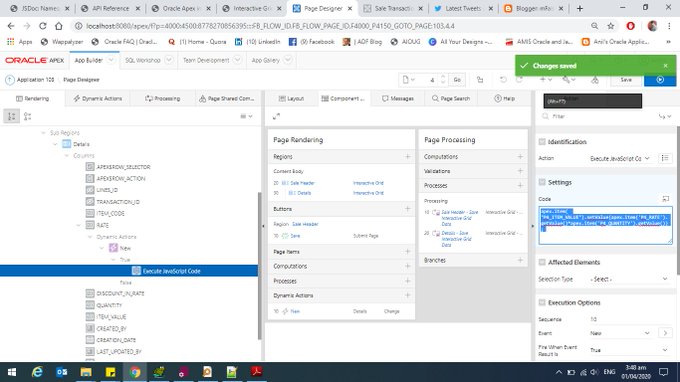
2) Write Dynamic action and call this JavaScript apex.item( "P4_ITEM_VALUE").setValue(apex.item('P4_RATE').getValue()*apex.item('P4_QUANTITY').getValue());
Oracle Tutorial, We have covered all Oracle articles which includes Oracle Database, Application, Framework, Oracle HRM, ADF Training and Financial Training. Further more we have queries and scripts for Oracle EBS Modules.
Tuesday, 31 March 2020
Compute and Set Interactive Grid Column Value Oracle Apex
Set / Get Interactive Grid Column Value Master Detail Form Oracle Apex 1) Assign Static Id to Column (that will be update by command) and use it's id in following commands. in my example P4_ITEM_VALUE is Static Id of Item Value Column.
2) Write Dynamic action and call this JavaScript apex.item( "P4_ITEM_VALUE").setValue(apex.item('P4_RATE').getValue()*apex.item('P4_QUANTITY').getValue());
Subscribe to:
Post Comments (Atom)
How To: Remove all rows from view object (VO) in OAF & ADF
This is the basic requirement when we are working with oracle OAF. In which we need to removed the all rows from the table. The best use ca...
-
Create Type Loop_Type is table of Varchar2(400) Create or Replace Function Find_Loop_F (P_End_loop in NUmber Default 10) Return Loop_Typ...
-
Run JavaScript Method in Java / ADF & OAF ** it is not Oracle standard. Example Code : try { ScriptEngineManager manager ...
-
The exact lines of Developers’ guide for use JavaScript are as follows: “UIX and the OA Framework are rapidly adding new features to provide...
No comments:
Post a Comment