Showing posts with label Java. Show all posts

Wednesday, 1 July 2026

Set Number Format in OAF


In oracle OAF , We can set the specific Number format for any Field. 

For that what we need to get the formatter and the we can apply the Decimal Validater on it. 

Noted : in the below code i hardcode my custom field. you can add your own field of use the parameter for field name. 


 //import oracle.cabo.ui.validate.Formatter; important Class for Formatting
 // Set Number fields Format
    public void setNumberFormatter(OAWebBean webBean) {

        Formatter formatter =
            new OADecimalValidater("###,###,##0.00", "###,###,##0.00");  // Formatter

        OAWebBean FarQuantity1_f = webBean.findChildRecursive("FarQuantity1");
        FarQuantity1_f.setAttributeValue(OAWebBeanConstants.ON_SUBMIT_VALIDATER_ATTR,
                                         formatter);

    }


Storing Expression Value in PLSQL and Java

Every Expression return True or False. So we can easily store their value in Boolean expression

Using this Method we can easily check conditions instead of testing these scenarios in IF-ELSE condition .

---Example of Storing Expression Value in PLSQL

---Example of Storing Expression Value in PLSQL
--By mFaisal
declare
lExpressionValue boolean;
begin
  --- Expression Value
  lExpressionValue:=1=2 or 2=2;
 
  -- Is True Then
  ---1
  ---else
  --2
 
if  lExpressionValue Then
    --1
  DBMS_OUTPUT.put_line('Expression is  True..');
  else
    --- 2
  DBMS_OUTPUT.put_line('Expression is not True..');
  end if;


end;


Example of JAVA Code

public class Server {

    public static void main(String[] args) {
        Server.isTrue((1==2));
    //isTrue((1=1)));
    }

   
    public static void isTrue(boolean expression) {
    if (expression) {
       System.out.println("Expression is true.");
    }
    else
    {
        System.out.println("Expression is not true.");
    }
    }


}


Thursday, 5 January 2023

Get XSID in oracle OAF - Value from cache

In Oracle Application Framework (OAF), you can use the getXSID() method of the OAFwkUtil class to get the current XSID (cross-session ID). The XSID is a unique identifier that is generated for each user session in OAF.

Here is an example of how you might use the getXSID() method in an OAF application:
Sql for this : select XSID from icx_sessions


Simple , You can use this (import this before any work WebAppsContext)

String xsid = webAppsContext.getEnvStore().setEnv("ICX_SESSION_COOKIE_VALUE");

Explanation:If you are trying to retrieve the value of the ICX_SESSION_COOKIE_VALUE environment variable and store it in a variable called xsid, you can use the getEnvStore().setEnv() method of the webAppsContext object in your code. This method will retrieve the value of the specified environment variable and store it in the xsid variable.

It is important to note that the getEnvStore().setEnv() method will only work if the ICX_SESSION_COOKIE_VALUE environment variable has been set in the environment where your code is running. If the variable has not been set, the setEnv() method will return null.

I hope this helps clarify how to retrieve the value of an environment variable using the getEnvStore().setEnv() method.

Sunday, 3 May 2020

Get Number of Rows returned by ResultSet in Java

A simple getRowCount method can look like this :

private int getRowCount(ResultSet resultSet) {
    if (resultSet == null) {
        return 0;
    }

    try {
        resultSet.last();
        return resultSet.getRow();
    } catch (SQLException exp) {
        exp.printStackTrace();
    } finally {
        try {
            resultSet.beforeFirst();
        } catch (SQLException exp) {
            exp.printStackTrace();
        }
    }

    return 0;
}


Just to be aware that this method will need a scroll sensitive resultSet, so while creating the connection you have to specify the scroll option. Default is FORWARD and using this method will throw you exception.
//step3 create the statement object  
Statement stmt=con.createStatement(ResultSet.TYPE_SCROLL_INSENSITIVE,ResultSet.CONCUR_READ_ONLY);  

How to move an undecorated JFrame in Java

How to move an undecorated JFrame in Java 

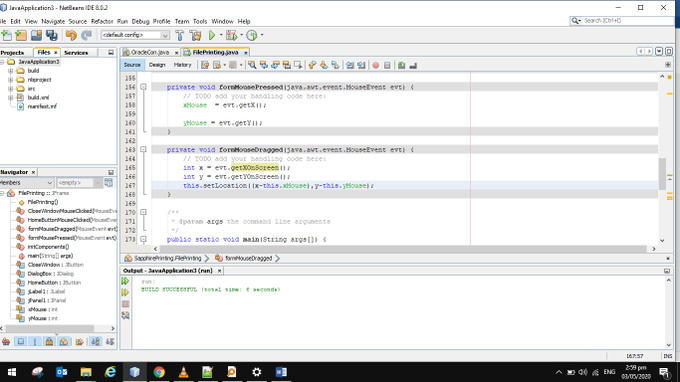
The first step is to create your project by clicking file at the top of your project and then click new project, you can name your project whatever you want. Create you form by right clicking the Source Packages and by selecting New JFrame Form and then drag panel component in your form.
then you will need to create a two event for your panel the Mouse Dragged and Mouse Pressed, copy paste the code below:

[java]
int xMouse;
int yMouse;
private void framedragMouseDragged(java.awt.event.MouseEvent evt) {
int x = evt.getXOnScreen();
int y = evt.getYOnScreen();

this.setLocation(x – xMouse , y – yMouse);

}

private void framedragMousePressed(java.awt.event.MouseEvent evt) {
xMouse  = evt.getX();
yMouse = evt.getY();
}


Thursday, 19 March 2020

Java File.deleteOnExit() method

  1. import java.io.File;  
  2. import java.io.IOException;  
  3. public class DeleteOnExitExample  
  4. {  
  5. public static void main(String[] args)  
  6. {  
  7. File temp;  
  8. try  
  9. {  
  10. temp = File.createTempFile("abc"".temp");     //creating a .temp file  
  11. System.out.println("Temp file created at location: " + temp.getAbsolutePath());      
  12. temp.deleteOnExit();                     //delete file on runtime exit  
  13. System.out.println("Temp file exists : " + temp.exists());  
  14. }   
  15. catch (IOException e)  
  16. {  
  17. e.printStackTrace();  
  18. }  
  19. }  
  20. }  

Wednesday, 18 March 2020

Update file to server OAF java

    public void uploadFileToServer(OAPageContext pageContext,String fileName,BlobDomain pBlobDomain)
    {
 
    try
    {
     File file = new File("/opt/apps/apps_st/comn/temp", fileName);
     FileOutputStream output =  new FileOutputStream(file);
    for (int bytes = 0; bytes < pBlobDomain.getLength(); bytes++)
    {
    output.write(pBlobDomain.getInputStream().read());
    }
    System.out.println(" file writing");
        output.close();
    }
    catch (Exception e)
    {
    e.printStackTrace();
    throw new OAException(e.getMessage(),OAException.ERROR);
    }
 
        throw new OAException(("file size:"+pBlobDomain.getLength()),OAException.ERROR);
    }

Tuesday, 3 December 2019

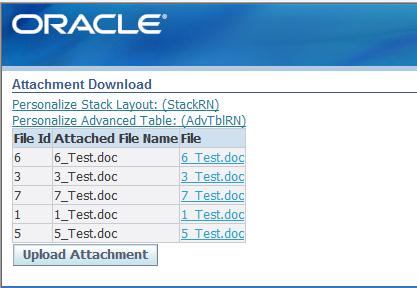
OAF Download Blob File Table Column

OAF Download Blob File Table Column

OAF Download Blob Table Column
1)Cretae custom table to store blob column.

CREATE TABLE xx_file_blobs
(
 file_id INTEGER
,Attached_file_Name VARCHAR2(50)
,Attached_file BLOB
,ContentType  VARCHAR2(50)
,creation_date DATE
,created_by    NUMBER
,last_update_date DATE
,last_updated_by INTEGER
,last_update_login INTEGER
) ;


2)In JDeveloper Create EO,VO and AM based on above table.

3)Create New Page .   Add AM to the page.
4) Create new region inside page with region style   advancedTable
5) Define View instance  XxFileBlobsVO1/<YourTableVO1>  on advancedTable
6) Create Column inside advTable for FileId.    Add sortable header and specify Prompt File Id for it.
    Add item to added Column.  Update View Attribute as FileId for item.


7) Create Column inside advTable for AttachedFile.    Add sortable header and specify Prompt AttachedFile  for it.
Add item to added Column. Assign
Id                            eg. AttachedFile
Item Style                      messageDownload
File MIME Type            Contenttype          //View Attribute which is picked from table column                        
Data Type                      BLOB
View Attribute as           AttachedFileName      // This will be name on Hyperlink.
File View Attribute         AttachedFile
Prompt                          File


Page xml For reference

<?xml version = '1.0' encoding = 'UTF-8'?>
<page xmlns:jrad="http://xmlns.oracle.com/jrad" xmlns:oa="http://xmlns.oracle.com/oa" xmlns:ui="http://xmlns.oracle.com/uix/ui" version="10.1.3_1312" xml:lang="en-US" xmlns:user="http://xmlns.oracle.com/jrad/user" xmlns="http://xmlns.oracle.com/jrad" file-version="$Header$">
   <content>
      <oa:pageLayout id="PageLayoutRN" windowTitle="Blob Attachment" title="Attachment Download" amDefName="xx.oracle.apps.ap.blobhandle.server.AppModule" controllerClass="xx.oracle.apps.ap.blobhandle.webui.AttachmentCO">
         <ui:corporateBranding>
            <oa:image id="corporateBrandingImage" source="/OA_MEDIA/FNDSSCORP.gif"/>
         </ui:corporateBranding>
         <ui:contents>
            <oa:stackLayout id="StackRN">
               <ui:contents>
                  <oa:advancedTable id="AdvTblRN" viewName="XxFileBlobsVO1">
                     <ui:contents>
                        <oa:column id="FileIdCol">
                           <ui:columnHeader>
                              <oa:sortableHeader id="sortableHeader1" prompt="File Id"/>
                           </ui:columnHeader>
                           <ui:contents>
                              <oa:messageStyledText id="FileId" viewAttr="FileId" prompt="File Id"/>
                           </ui:contents>
                        </oa:column>
                        <oa:column id="AttachedFileNameCol">
                           <ui:columnHeader>
                              <oa:sortableHeader id="sortableHeader2" prompt="Attached File Name"/>
                           </ui:columnHeader>
                           <ui:contents>
                              <oa:messageStyledText id="AttachedFileName" viewAttr="AttachedFileName"/>
                           </ui:contents>
                        </oa:column>
                        <oa:column id="AttachedFileCol">
                           <ui:columnHeader>
                              <oa:sortableHeader id="sortableHeader3" prompt="File"/>
                           </ui:columnHeader>
                           <ui:contents>
                              <oa:messageDownload id="AttachedFile" viewAttr="AttachedFileName" fileContentType="Contenttype" prompt="Attached File" dataType="BLOB" contentViewAttributeName="AttachedFile"/>
                           </ui:contents>
                        </oa:column>
                     </ui:contents>
                  </oa:advancedTable>
                  <oa:submitButton id="UploadAttachBtn" text="Upload Attachment" prompt="Upload Attachment"/>
               </ui:contents>
            </oa:stackLayout>
         </ui:contents>
      </oa:pageLayout>
   </content>
</page>


Note :-- Upload Attachment button navigates to Upload Page. (For Inofrmation only)


For more information
Page 350 Of OA Framework Developer Guide

Declarative Implementation
Perform the following steps to implement the File Download feature declaratively in an OA Extension page.
Step 1: Create a region in your page layout region, with the
Form property set to true for the page layout.
Step 2: In the new region, create an item of item style
messageDownload.
Note:
If you implement a messageDownload item in a table or advanced table region, the view object used to
render the table or advanced table must have a designated primary key, otherwise the messageDownload web
bean will repeatedly download content from the first row.
Step 3: In the OA Extension Property Inspector, set the following properties for the messageDownload item:
􀁹
View Instance - The view object instance of the underlying data source.
􀁹
View Attribute - The view attribute that maps to a column in the underlying data source.
􀁹
File View Attribute - The view attribute that maps to the column that stores the file content.
􀁹
File Name Override - The file name to save to when you select the File Download link and choose the
Save option in the File Download window to save the file. The default file name that appears in the File
352
Name field of the Save As dialog window is derived from the value returned from the view attribute
specified by the View Attribute property. The value of the File Name Override property overrides that
default file name and is especially useful if the view attribute returns instructional text, such as "Click on
this link to download the file". If the File Name Override property is not defined, then the file name to
save to is the value returned from the view attribute.
􀁹
File MIME Type - The MIME type of the file. See the Runtime Control example below if you do not want
to specify a static value for this property.
􀁹
Data Type - The data type of the File View Attribute. The BLOB datatype is supported for File
Download.
􀁹 Prompt - The text prompt that proceeds the File Download link.
   

How To: Remove all rows from view object (VO) in OAF & ADF

This is the basic requirement when we are working with oracle OAF. In which we need to removed the all rows from the table. The best use ca...